Welcome

Welcome to Baqer J. Al-Lawati blog.

Monday, 28 October 2013

Using Spreadsheets

Okay, so now you have a list of data recorded and saved as a CSV file and you want it as a spreadsheet. First of all, you've got to know a bit (or a lot) more about them before doing anything. So first things first.

1) What is Spreadsheets Modelling?
Spreadsheet Modelling is a computer program that allows you to create, edit and maintain full data. Note that the output depends on the input. Changing the input value will most certainly affect the output.

2) List three uses of Spreadsheets.
So you're wondering what those spreadsheets can do? Well, you can put it this way: It is used to design, perform calculations, produce high quality output; the fact is that it is actually used to predict the possible outcomes 

3) What does CSV.File stand for.
You should be very aware that CSV stands for "Comma Separated Values". Forget this and see where that'll get you. 

Saturday, 19 October 2013

System Documentation


Friday, 18 October 2013

System Design (Home-Work Question)

When desigining a layout, the analyst will be influenced by the views of the users and their requirements. He'll need to consider who will see them. There will also need to be consultation with the owner(s) of the firm.

For screen forms, the analyst has to consider the attractiveness of the screen layout and its simplicity. The screen form should not be complicated for the users and it is heavily advised to include on-screen instructions on how to navigate from screen to screen.
The main aspects of the way output is designed is its output and the medium it is to be produced on.

The format could be: graphs, tables, reports or lists of records. The medium on the other hand could be a hardcopy (paper), a softcopy (screen display) and/or sound.

Sometimes, the designer will also want to consult customers via questionnaires in order to design the most suitable system for the firm. It is normal for system analysts to produce three or four different designs of an item output. When designing these, the analyst is fully aware of what the purposed system is capable of producing. The users of the system will also be asked for their views.

Tuesday, 21 May 2013

Using ICT in Project Management

Use of ICT in Project Management

_______________________________________

Why is it needed?

Time is the most important element and the one in shortest supply. For any project, it is essential that a business has to plan for it. Projects include: construction of a new building, designing an aircraft, starting up a business, etc... Would you imagine how carrying out the process would be if they were not planned?

How to manage a project?

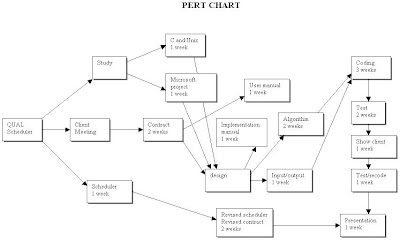
There're simple applications which could be used for project management but there're sophisticated software's which are used for the purpose. However, the most popular tools now-a-days are the Gamtt & Pert Charts.

A PERT chart is a project management tool used to schedule, organize, and coordinate tasks within a project. PERT stands for Program Evaluation Review Technique, a methodology developed by the U.S. Navy in the 1950s to manage the Polaris submarine missile program.


Gantt chart is a type of bar chart, developed by Henry Gantt in the 1910s, that illustrates a project schedule. Gantt charts illustrate the start and finish dates of the terminal elements and summary elements of a project.Some Gantt charts also show the dependency (i.e. precedence network) relationships between activities. Gantt charts can be used to show current schedule status using percent-complete shadings and a vertical "TODAY" line as shown here.


Wednesday, 27 March 2013

Stock Control

Stock Control

What is Stock Control?

Stock Control is the system which monitors the items in stock. Should the store run low on items, re-ordering is required.


Note that too much stock is not good for the store; nor too little is. This is due to several facts including:-

* Too much stock costs more money. Keeping too much stock could lead to 'stock overload'

Storing a lot of perishable items such as food is not a good idea as these items are going to perish sooner or later.

Having too little stock means that the store is going to run out of stock before the next delivery times.

Point-of-sale (POS) is the place where items are retailed and all transactions are made. Refunds are also done there. A POS consists of a screen, a barocde reader & a number pad (should the barcode reader goes out of order. A normal POS is called as the manual system as it doesn't keep track of stock constantly. It is not connected to a database over a netowork and hence re-ordering and update take place manually.

An Electronic Point-of-sale on the other hand is known as the automatic system. It pretty much consists of the same components as the normal POS. The only difference is that the EPOS is connected with a database. This means that most of the things are done automatically.

The whole process of the EPOS has some benefits to both the super markets & the customers. They involve:-

Goods are re-ordered automatically when stock falls under the the re-order level.

- Stock is updated after each transaction leading to a more accurate idea of stock levels.

- Questions over the bill can be resolved in a blink of an eye as a result of the itemized bill

- The use o f barcodes ensure greater accuracy and reduce errors.

In old times, retailing stores used to go counting the items in stock and ordering a large amount of items from the wholesalers. This done annually. The problems arises from the financial point of view as the company or supermarkets have to pay a substantial amount of money for the warehouse facilities and employees. Hopefully, the 'just-in-time' solves this issue as it ensures items to be delivered right where and when the company needs them.
When the stock falls under the re-order level, automatic order is being placed and therefore items get delivered without the need to store them in large warehouses. This means less fresh products are wasted and no need for high charges. 

Tuesday, 5 March 2013

Impact of ICT on Working Practices

Impact of ICT on Working Practices

 ICT has changed the world enormously in many different ways. People used to send written letters and it would take months to reach to the recieving party but today e-mails are used to deliver instant messages. From the social aspect, ICT has changed the way people used to communicate as it has introduced social netwroking sites to the world. But lets not forget on the working practices as well.


Q) How do workers experience this?

Workers' premises has been altered and  made more flexible. Workers can work remotely from home or anywhere away from their workplace. They can connect to their work's database via Virtual Private Network (VPN). This is a secure connection between the worker's PC/laptop and the company's network.

Q) How the working practices are different from the past?

Past: In the past, written documents were very common. Companies used to have a whole room for storing files. Those rooms were called as the "Registries". Companies also had to employ typists.When companies receive letters as written documents, typists would type them using a typewrite.

Today: Today, files are stored as digital format in small few hard disks and can be accessed by more than one person per time. Even documents can be word processed by clerks who can edit these documents effectively.

Old OfficeModern Office

ICT has made the world more efficient than before and work can be achieved much faster and effectively.


Teleworking

Teleworking

People have been working in their workplaces every working day and earn their salaries monthly. But there have been times when an employee cannot attend his/her workplace because of certain circumstances such as falling ill or looking after a baby. When they were incapable of coming to work, they weren't able to do their work and hence have a lot to catch up.

Today, we don't have that problem since teleworking has become common. Teleworking: Employment in home while communicating with the workplace such as a company, bank, etc... using a phone, fax, modem, etc...

With the availability of technology tools such as the internet, workers are able to work with the presence of family with the worker's home. The employee does his work from home, his manager keeps a constant check on him to make sure that the work is being done. The worker then submits his work on a specific time to the workplace. However, some employee don't recommend working from home as they don't trust themselves whether they'll manage their time well or not.


Q) What is Remote Work?

Remote Work is when someone works away from office such as a professorial going down to the petrol extraction field. He then has to report back to the workplace wirelessly. This is known as Remote Working. Another example is a case in which a doctor has to visit his patient. He'll check the situation and checks the hospital database remotely.

Q) What is a Home Based Work?

Home Based work is the usual work that is done by the workers & managers in their workplace. An obvious example is a teacher teaching in school.